Setting Auto Reply for Email
Select File > Automatic Replies.

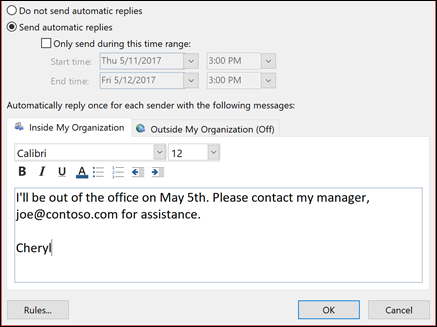
In the Automatic Replies box, select Send automatic replies.
Optionally, set a date range for your automatic replies. This will turn off automatic replies at the date and time you enter for the end time. Otherwise, you'll need to turn off automatic replies manually.
Note: If you don't see Automatic Replies, use Rules and Alerts to set up your out-of-office message.
On the Inside My Organization tab, type the response that you want to send to teammates or colleagues while you are out of the office.
Note: Sending automatic replies to anyone outside my organization will send your automatic reply to every email, including newsletters, advertisements, and potentially, junk email. If you want to send automatic replies to those outside your organization, we recommend choosing My contacts only.
Select OK to save your settings.
Turn off automatic out-of-office replies
When Outlook is setup to send automatic replies, you'll see a message under the ribbon with this information. Select Turn off to disable automatic out-of-office replies. If you want to modify the dates for your automatic reply or the message sent, use the steps above to modify your settings.
Related Articles
Setting Auto Reply for Email
https://support.microsoft.com/en-us/office/send-automatic-out-of-office-replies-from-outlook-9742f476-5348-4f9f-997f-5e208513bd67 Select File > Automatic Replies. In the Automatic Replies box, select Send automatic replies. Optionally, set a date ...Forwarding Email in Outlook
https://support.microsoft.com/en-us/office/turn-on-automatic-forwarding-in-outlook-7f2670a1-7fff-4475-8a3c-5822d63b0c8e This can only be done at outlook.office.com At the top of the page, select Settings> View all Outlook settings. Select Mail > ...Forwarding Email in Outlook
https://support.microsoft.com/en-us/office/turn-on-automatic-forwarding-in-outlook-7f2670a1-7fff-4475-8a3c-5822d63b0c8e This can only be done at outlook.office.com At the top of the page, select Settings> View all Outlook settings. Select Mail > ...Sending outbound emails from Zoho Desk
Sending Outbound Emails Sending outbound emails is no different from creating a ticket manually in Zoho Desk. Just enter the ticket details you usually do and click Send as Email at the bottom of the "Add Ticket" window. Here is how you do it: From ...Sending outbound emails from Zoho Desk
Sending Outbound Emails Sending outbound emails is no different from creating a ticket manually in Zoho Desk. Just enter the ticket details you usually do and click Send as Email at the bottom of the "Add Ticket" window. Here is how you do it: From ...